Capture or export one PDF page as JPG, PNG or WebP. Let AI remove the visible mark from that page image, then review the text and tables and download a separate PNG.
Original unchanged
PNG output
1 free credit on first Google sign-in
1 credit per repair
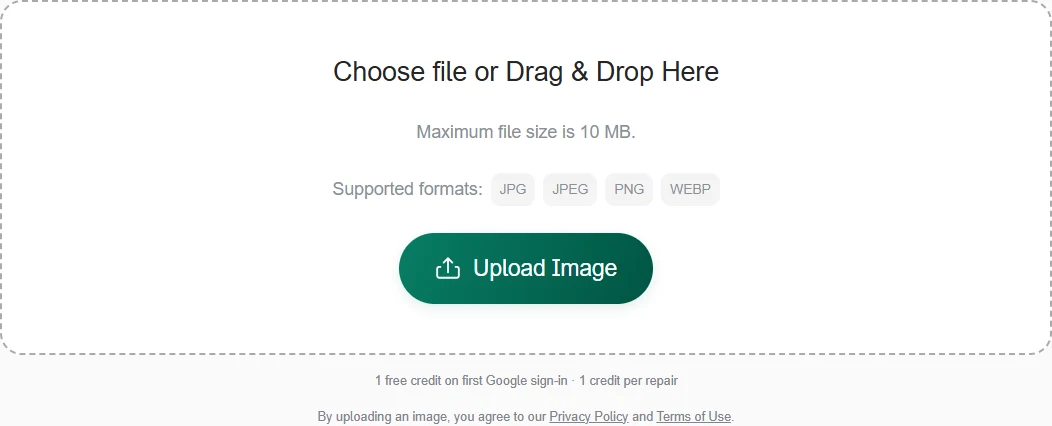
Only upload images you own or have permission to edit. By uploading, you agree to our Terms and Privacy Policy.
Processing your image
Remove Watermark
Let AI find and remove visible watermarks. No selection needed.
Brush or select the watermark you want to remove.
Selection Tool
Preparing image0s elapsed
Preparing imageOpening and sending your image
Removing watermarksAI identifies marks and restores the background
Final processingPreparing your file for download
Keep this page open.
Each new repair uses 1 credit. Comparing and downloading are free.
Try a sample
Trusted by 100,000+ paying customers in 200+ countries worldwide.
Stripe checkout
One-time payment · No subscription
Credits never expire
PDF PAGES, IMAGE WORKFLOW
Remove a watermark from a PDF page screenshot
This PDF watermark remover works on a screenshot or image exported from a PDF page. Save the page you need as JPG, PNG or WebP, then upload it to remove visible watermark text or logos from the image.
The PDF screenshot watermark remover processes the complete page image without tracing each letter. Compare the cleaned image with the source and download PNG for a slide, reference packet or other image workflow. The original PDF file stays unchanged.
PDF Screenshot Watermark Remover — Features & Limits
Remove a visible watermark from one PDF page screenshot or exported page image. Review page labels, chart values and small print before downloading a separate PNG for your presentation or reference.
Feature
What ImgUnmark offers
One PDF page screenshot
Capture the page you need or export it as JPG, PNG or WebP, then upload that image. This focuses the repair on one page for a slide, visual reference or report illustration.
Preview stamps and URL overlays
Automatic can try a diagonal preview stamp, repeated text, visible logo or URL over the page image. Start without brushing, then compare the complete page for remaining marks and changed details.
Local repair near a diagram
Use Manual Erase to select a mark beside a chart, technical drawing or map. Keep diagram labels and legend text outside the mask where possible; Manual Erase keeps those unselected pixels.
Keep margins and page proportions
Manual Erase preserves the dimensions of the page image you edit without cropping the margins. Automatic output dimensions and framing can vary, so compare the full page before placing it in a layout.
Check small print and chart values
Compare table values, units, figure labels, map legends and scale bars at a readable zoom. AI reconstruction can alter a character or line, especially where the watermark overlaps the original content.
Refine a remaining mark
If a stamp edge remains after Automatic, use Manual Erase on that region or return to the original page image. Each new repair uses a credit, so check the result before starting another.
Separate PNG output
Download the edited page image as PNG while keeping the original PDF intact. Use the PNG as a visual asset. Multi-page PDF output, editable PDF layers and OCR text are outside this workflow.
Supported images
Upload one JPG, PNG or WebP up to 10 MiB and 4,096 px on the longest edge. Use a clear export so that small marks and nearby details are visible.
Free credit and repair cost
Sign in with Google to get one welcome credit. Each new repair uses one credit. Comparing and downloading an existing result use no extra credits. Confirmed failed repairs return the credit.
Image privacy
AI repairs send image content to a processing service. Originals, selection masks and results are kept in private storage without automatic expiry. Privacy Policy
PDF page screenshots, before and after
Explore a NASA telescope fact sheet, a USGS streamflow report and a volcano monitoring map as PDF page images with demonstration watermarks.
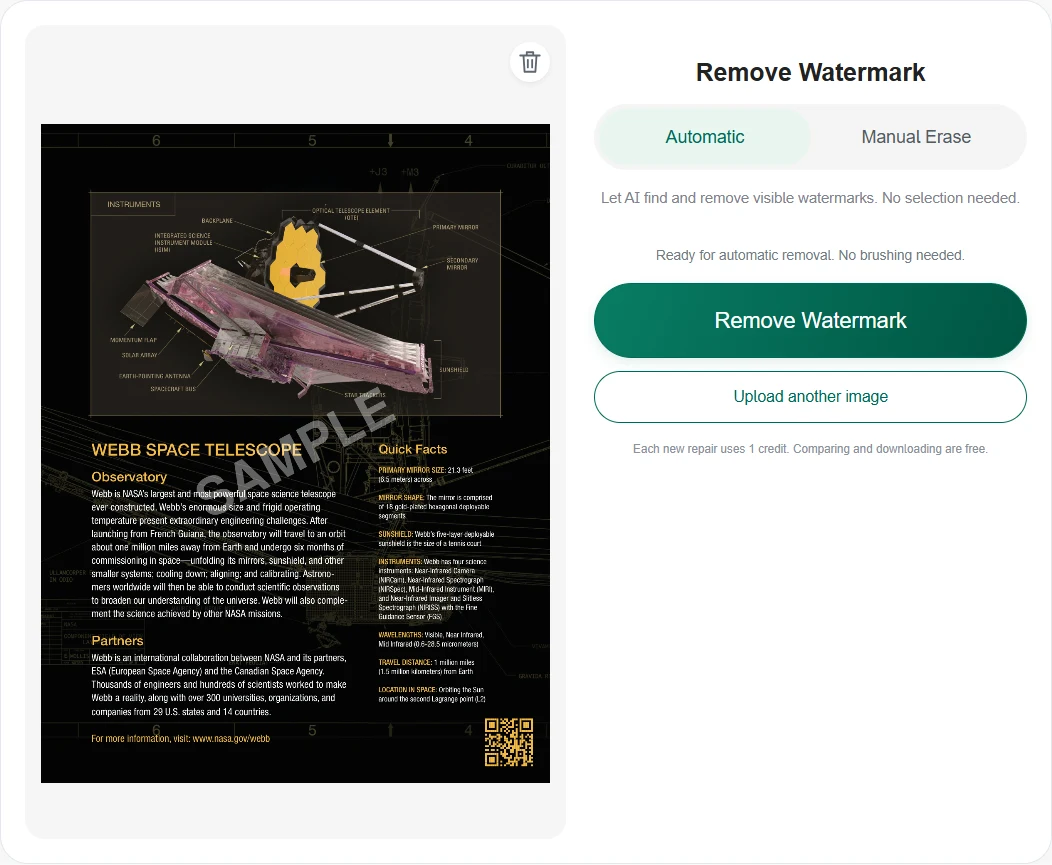
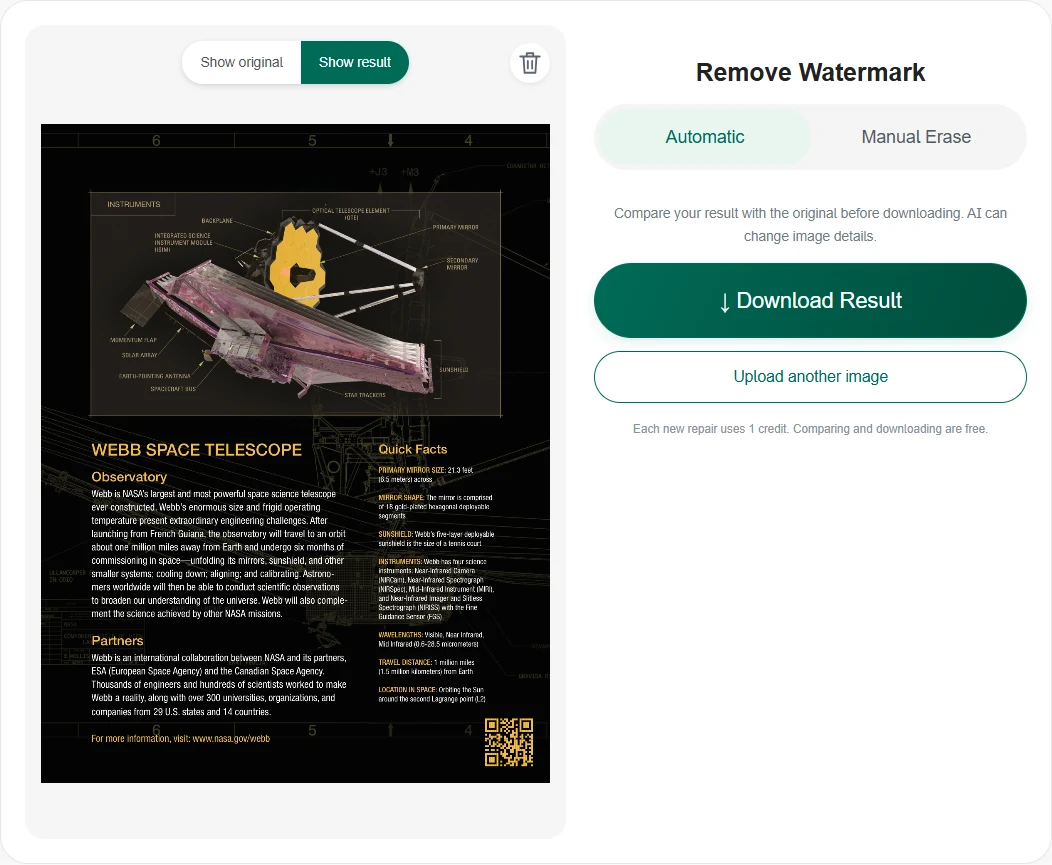
NASA's Webb Space Telescope fact sheet combines a labeled instrument diagram with small specifications on a dark background. Use the PDF watermark remover to try the added SAMPLE overlay on this page image. After you remove a watermark from a PDF screenshot, check the mirror dimensions and instrument names. The clean reference is the original publisher page, not a processed result. Try this PDF page image. Source: NASA, page 2.
Demonstration overlayClean source reference
Check the 6.5-meter mirror size, 18 mirror segments, instrument labels and white text on the dark background.
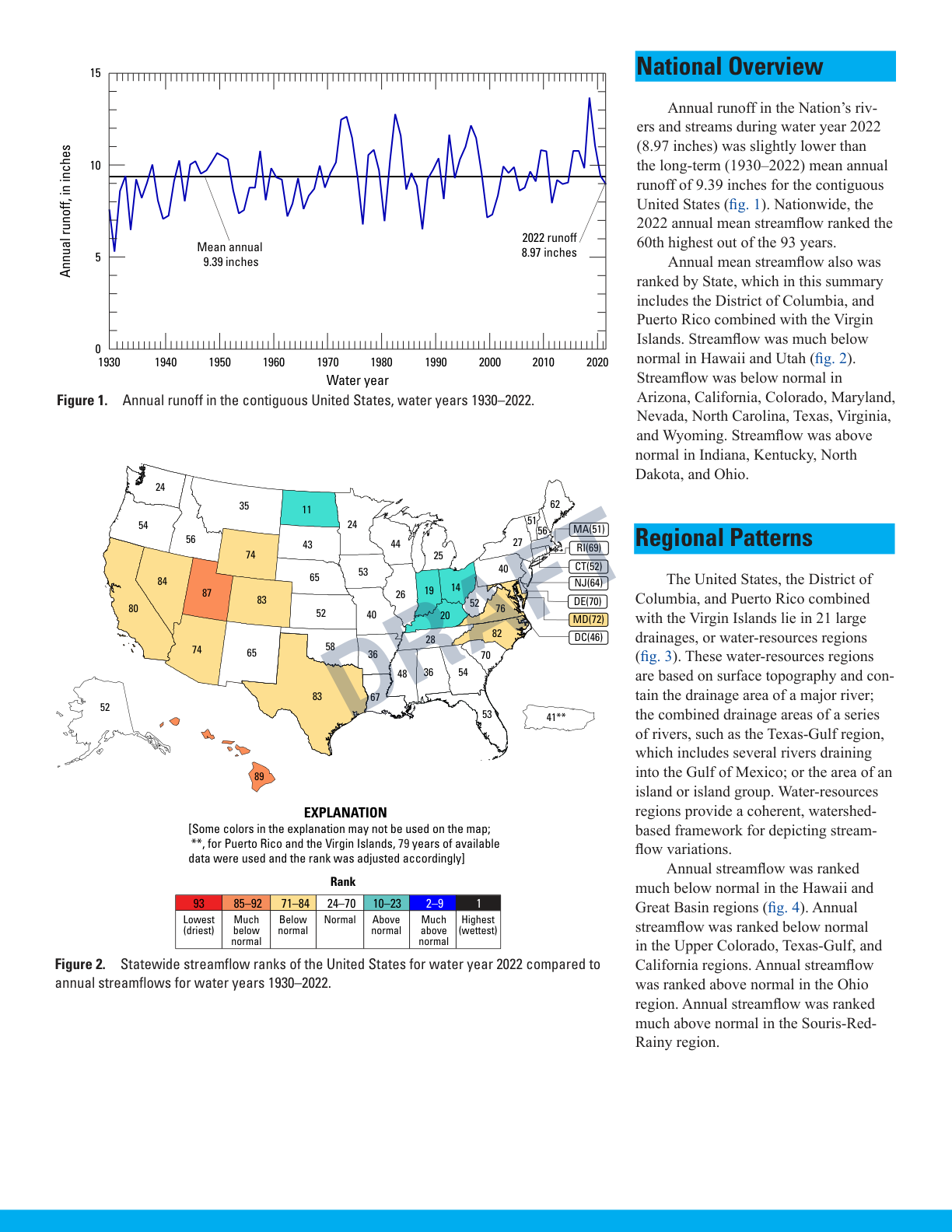
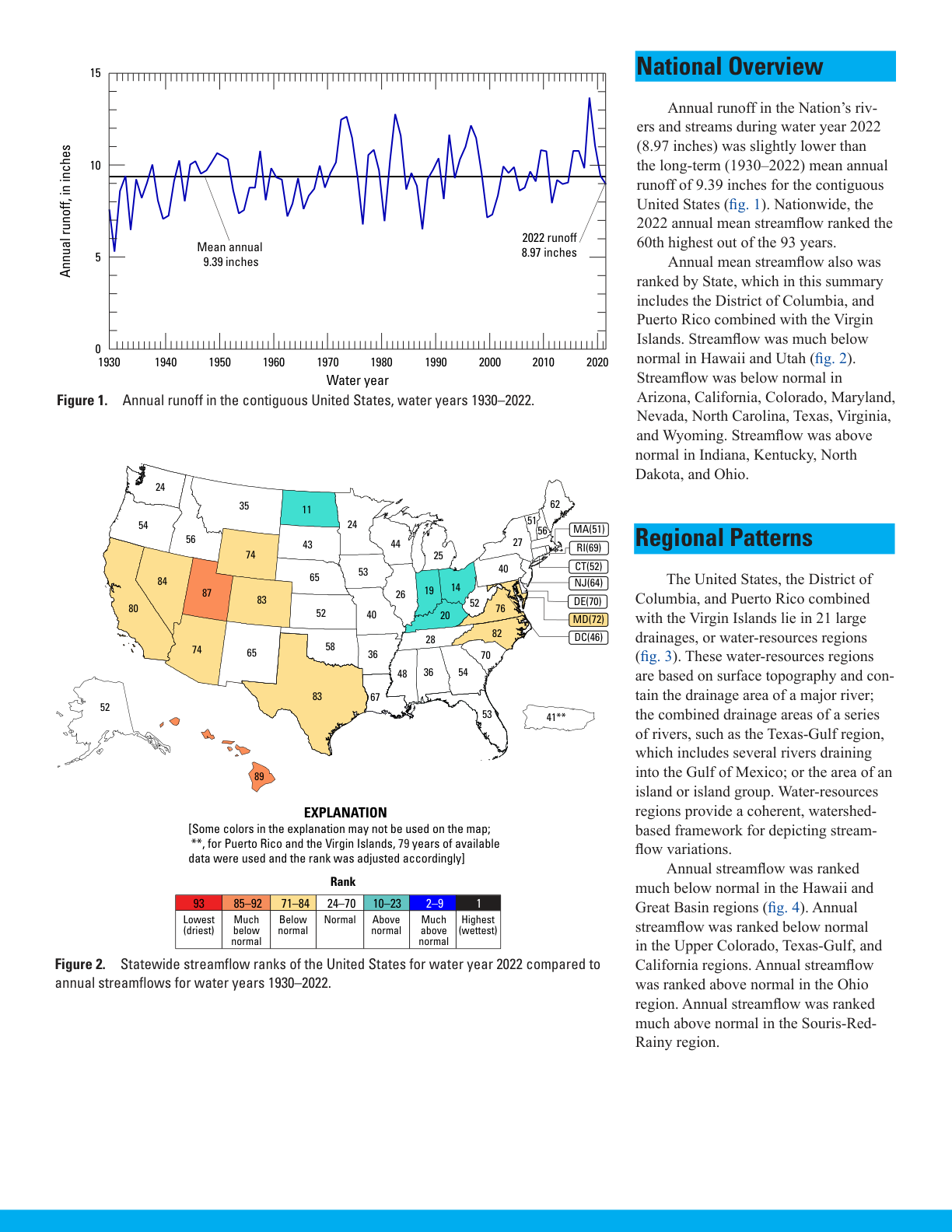
This USGS report page combines a runoff chart, state ranking map and two columns of analysis. The added DRAFT overlay provides a sample for the PDF screenshot watermark remover. When you remove watermarks from PDF screenshots, compare axis labels, map colors and runoff figures with the source. The right-hand image is the clean publisher reference; your repair result may differ. Try this PDF page image. Source: U.S. Geological Survey, page 2.
Demonstration overlayClean source reference
Compare 8.97 inches for 2022 runoff, the 9.39-inch long-term mean and the state ranking legend.
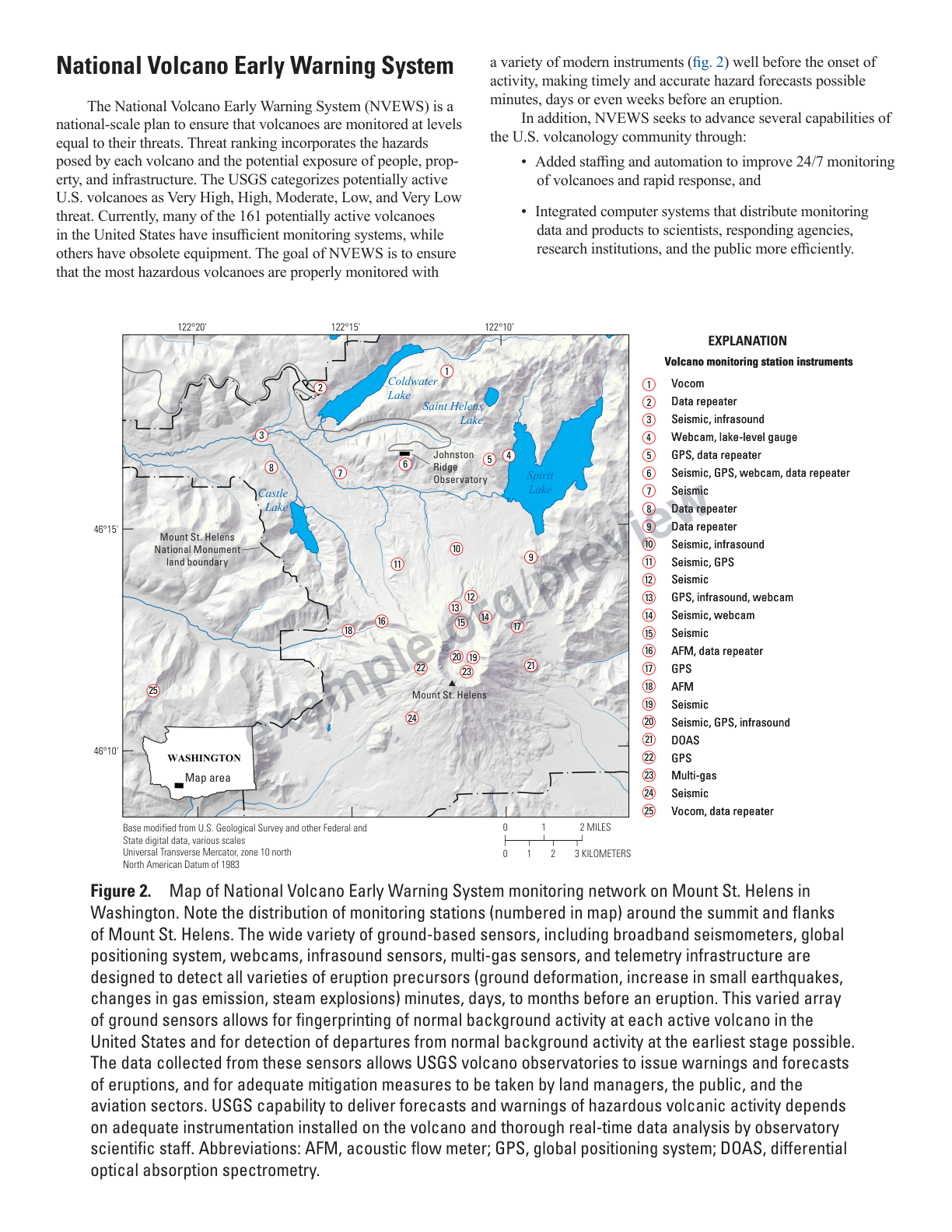
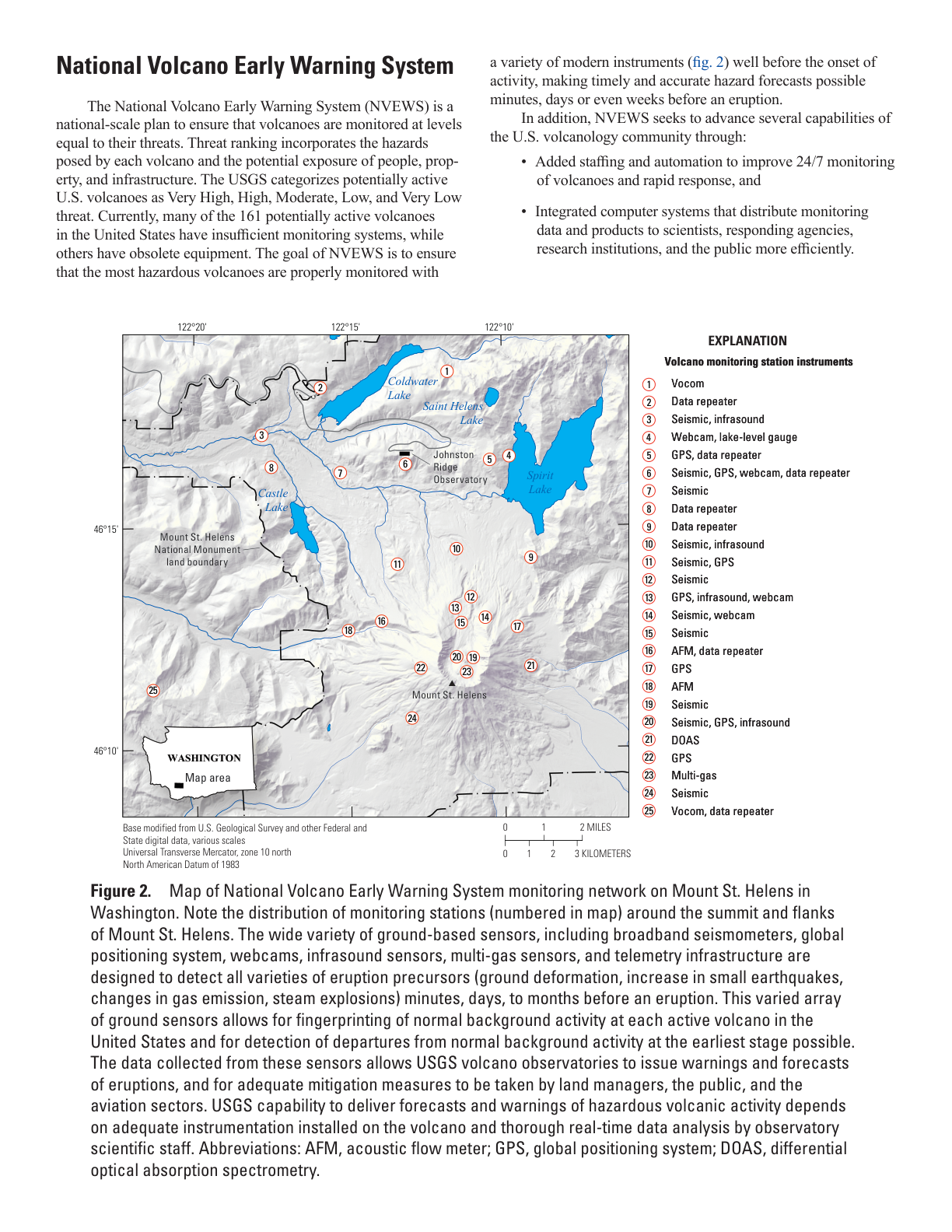
The USGS volcano monitoring page pairs a Mount St. Helens map with numbered station markers and an instrument legend. Try the PDF watermark remover on the added example.org/preview URL overlay. After you remove a watermark from a PDF screenshot, inspect small map labels, station numbers and legend entries. The clean page beside it is a reference from the source PDF, not an AI output. Try this PDF page image. Source: U.S. Geological Survey, page 2.
Demonstration overlayClean source reference
Inspect Mount St. Helens and Spirit Lake labels, numbered monitoring stations, the scale bar and instrument legend.
Left: an added demonstration watermark. Right: the clean publisher page for reference, not an AI repair result. PDF sources: NASA and U.S. Geological Survey; source links are included with each example.
PDF SCREENSHOT WATERMARK REMOVAL
PDF watermark remover features for page images
Use this watermark remover from PDF screenshot upload to PNG download, with automatic processing and comparison in one place. The PDF screenshot watermark remover works on visible image pixels, including marks crossing paragraphs and tables.
Process the complete PDF page image
The PDF watermark remover processes the uploaded screenshot without a painted selection. Remove watermarks from PDF page images containing faint diagonal words or repeated review labels, then inspect the paragraphs and table cells beneath the mark.
Upload the page image from your PDF viewer
To remove a watermark from a PDF screenshot, capture or export a clear page image first. The PDF screenshot watermark remover accepts JPG, PNG and WebP, so your choice of PDF viewer does not change the image workflow. Process additional pages one at a time.
Compare the text before downloading PNG
After you remove watermarks from PDF screenshots, compare the original and result at a readable size. The PDF watermark remover returns PNG rather than an edited PDF. Check numbers, names, units and small type because reconstruction can change individual characters.
Choose the PDF page image you need to clean
Image source
What to upload
What to check
Technical PDF screenshot
A clear capture or exported JPG/PNG/WebP.
Small type, units, tables and page labels.
PDF text page screenshot
The captured page image.
Headings, paragraphs and punctuation.
PDF report screenshot
The image containing the visible watermark.
Chart values, captions and table cells.
Scanned PDF page image
A readable, straight scan saved as an image.
Letter shapes, checkboxes and fine rules.
Check PDF page text after watermark removal
The PDF screenshot watermark remover reconstructs the complete image, so it cannot guarantee character-for-character preservation. After you remove watermarks from PDF page images, compare the source and result at a readable size, especially where a watermark crosses technical values or small print.
Check numbers, units, names and punctuation.
Inspect table cells, chart labels and column boundaries.
Keep the original screenshot alongside the cleaned result.
Upload only images you have permission to modify.
How to Remove a Watermark from a PDF Page Screenshot
1
Capture and upload one PDF page
Take a screenshot or export the page as JPG, PNG or WebP. Sign in with Google and click Upload Image to choose the image file, up to 10 MiB.
Switch between Show original and Show result. Check page labels, small print and table or chart values. Click Download Result to save the edited page as a PNG image.
The screenshots show the practice image and its saved repair.
QUESTIONS & ANSWERS
PDF watermark remover questions
Can I remove a pdfFiller watermark from a PDF screenshot?
If you searched for "pdffiller remove watermark", you can try ImgUnmark on a PDF page screenshot you have permission to edit. Upload JPG, PNG or WebP, remove the visible watermark, then compare and download PNG. This PDF watermark remover works on image pixels; it does not connect to pdfFiller or edit the original PDF file.
How do I remove a water mark from a PDF?
To remove a water mark from a PDF, capture or export the page as an image first. If you searched for "how remove watermark from pdf", upload that JPG, PNG or WebP and select Remove watermark. The PDF screenshot watermark remover returns a PNG image to inspect and download; the original PDF stays unchanged.
Is this PDF watermark remover free to use?
You can try one AI page-image repair online for free with the 1 credit included on first Google sign-in. For a "remove watermark from pdf online free ai" workflow, upload a PDF page screenshot as JPG, PNG or WebP, select Remove watermark, then compare and download PNG. Each repair costs 1 credit; additional repairs require credits. Direct PDF upload and PDF export are not supported.
Can I upload and download PDF files directly?
No. The PDF watermark remover on this page accepts JPG, PNG and WebP images and downloads PNG. To remove watermarks from PDF pages here, capture or export each required page as an image first. It does not produce a multi-page PDF or preserve editable PDF objects.
How to remove watermarks in PDF page screenshots without brushing?
Upload the page image and use automatic removal in the PDF screenshot watermark remover. You do not need to circle or brush over each watermark. To remove watermarks from PDF page screenshots, the tool processes the complete image, then lets you compare the result with the original.
How do I remove a link watermark from a PDF screenshot?
If "pdf how to remove link watermark" describes a visible URL overlay, capture the PDF page as JPG, PNG or WebP, upload it and select Remove watermark. The PDF screenshot watermark remover processes visible image pixels, including URL text, DRAFT labels and diagonal marks. Compare the text beneath the overlay, then download PNG. This workflow does not edit clickable PDF hyperlinks or link annotations in the original PDF.
Can I remove watermarks from scanned PDF pages?
You can use the PDF screenshot watermark remover on a scanned page saved as JPG, PNG or WebP. Start with a straight, readable image. This workflow removes visible watermarks from PDF page images and returns PNG; it does not perform OCR or create searchable PDF text.
Will PDF watermark removal preserve every word and number?
Exact text preservation is not guaranteed. The PDF watermark remover reconstructs image pixels, so characters, values, punctuation or fine lines can change. After you remove watermarks from PDF screenshots, compare names, technical specifications and table cells with the source.
What are the PDF page image size and page limits?
Upload one JPG, PNG or WebP up to 10 MiB and 4,096 px on the longest edge. Download as PNG. Manual Erase keeps the input pixel dimensions. Automatic output dimensions may vary. Process additional page images one at a time.
How are PDF screenshots processed?
Automatic PDF screenshot watermark removal sends the complete image to APIMODELS. Generated outputs may be retained by the provider for up to 30 days. Images use private temporary Cradler storage. Repair links expire after 30 minutes; files are removed by daily cleanup. Use the PDF watermark remover only for images you have permission to modify.