
A guide from the ImgUnmark team, based on our product’s workflows and limits.
To remove a watermark from a PDF, first identify whether it is a separate PDF object or part of a scanned page image. A supported watermark can be removed in a PDF editor; a flattened mark needs image repair or a clean export from the original document.
Cropping can hide a watermark only when the mark sits outside the content you need to keep. When it crosses the text, cropping also removes useful document content. Cropping changes the visible page area and does not reliably delete the underlying PDF content.
If you own the document or have permission to edit it, this guide covers three routes. The PDF watermark remover handles page screenshots and returns PNG; the other methods are for readers who need a PDF file back.
1. Export the page as PNG

Start with a screenshot or an exported JPG, PNG or WebP page image, not the PDF file.
2. Upload the image
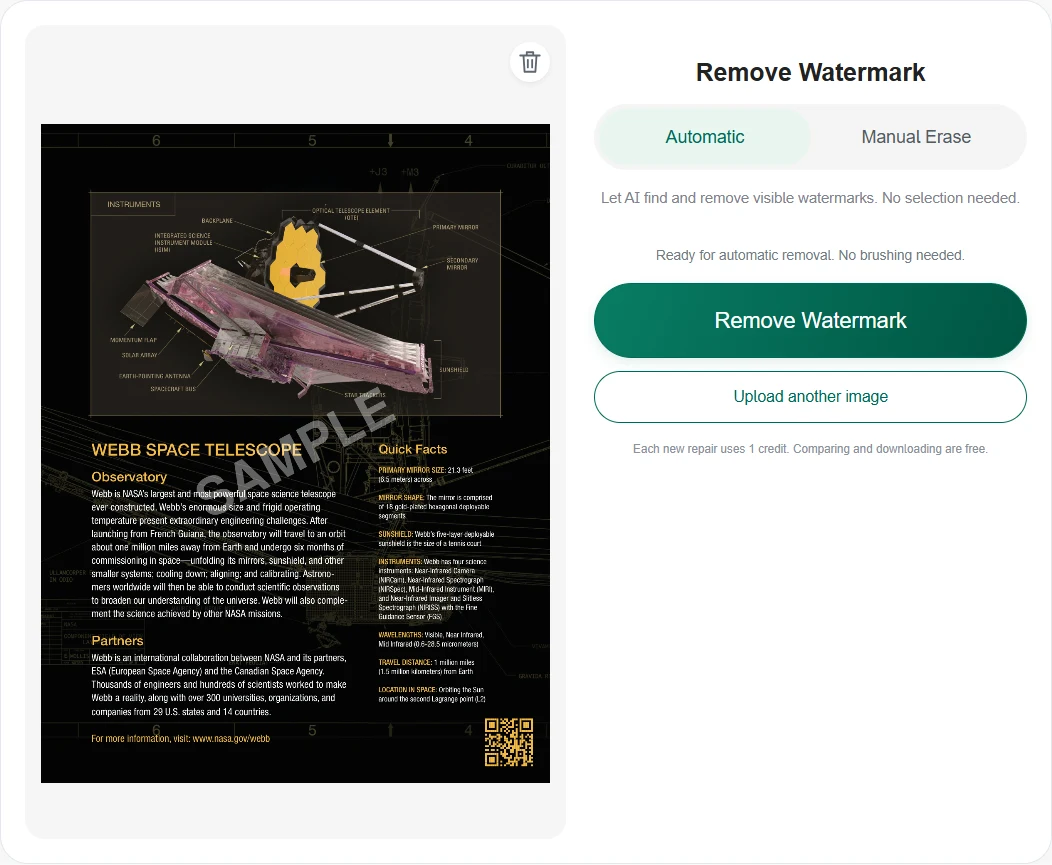
Upload the page image. In Automatic mode, choose Remove Watermark.
3. Compare and save PNG
Compare your actual result with the source. Check every important word, number and table cell, then download PNG. The original PDF stays unchanged.
ImgUnmark handles images only — export the PDF page as a PNG first (or take a screenshot of the page). Direct PDF upload is not supported; the result is a separate PNG.
Why does this watermark appear?
A PDF watermark may identify a draft, show the document owner, or label a preview export. Its appearance alone does not tell you how it was stored. Two identical DRAFT stamps may need different removal methods.
In a digital PDF, the mark may be a separate text or image object. Some editors recognize a watermark created through their own watermark command. Other files contain stamps, background artwork or ordinary page objects that the same command will not recognize.
In a scan or flattened export, the watermark and page content can share the same pixels. There is no separate lettering layer to delete. OCR may add searchable text, but that does not separate the visible watermark from the underlying page image. For ordinary photos and other flattened pictures, see how to remove watermarks from images for selected-area repair methods.
Try selecting a sentence in your viewer, then inspect the mark in an editor. Selectable text is a useful clue, not proof: a scanned page can also have an invisible OCR text layer. Keep a copy of the original before making changes.
Before you start: what you'll need
Prepare these three things before choosing a method:
- Permission to edit the document and an untouched backup. For confidential material, check whether uploading it to an online service is allowed.
- A clear output requirement: a single page image for a slide, or an actual PDF with searchable text, links and multiple pages. A PNG is not a substitute for every PDF workflow.
- The right tool: ImgUnmark for a page image, a PDF editor for supported watermark objects, or the original document application for a fresh export.
For ImgUnmark, capture or export one page as JPG, PNG or WebP, up to 10 MB. Google sign-in is required. First sign-in includes 1 credit, and each new repair uses 1 credit. The watermark removal pricing page explains additional credit packs. Comparing and downloading an existing result do not use another credit.
How to remove it: 3 ways, ranked by your output needs
Start with method 1 when you need a page image. If you need an editable or multi-page PDF, go directly to method 2 or 3; converting every page to an image can lose features you need.
1. Repair a PDF page screenshot with ImgUnmark
This route suits an authorized scanned handout, reference page or diagram that you want to reuse as an image. It reconstructs visible pixels rather than removing a PDF layer.
- Open the PDF in your viewer. Export the required page as an image, or capture it at a size where the smallest important text remains legible. Avoid browser toolbars and unrelated personal information in the capture.
- Open ImgUnmark's PDF page screenshot tool, sign in with Google and choose Upload Image. Select the JPG, PNG or WebP page image, not the PDF file.
- Leave Automatic selected and choose Remove Watermark. This mode processes the whole page image; you do not need to brush over each letter of a diagonal stamp.
- Switch between Show original and Show result. Read names, dates, numbers, units and table entries against the source. Reject a result that looks cleaner but changes important content.
- Choose Download Result to save PNG. Your source PDF stays unchanged. Additional pages require separate uploads and repairs; the tool does not assemble a multi-page PDF.
Export at a size where the smallest important text remains legible. A dense full-page report can lose small-text clarity during image processing. Use a relevant page region when an image excerpt is sufficient, or a native document workflow when exact text matters.
Do not treat reconstructed contract wording, account numbers or technical measurements as authoritative. For documents whose exact wording matters, obtain a clean original or use the source-file method instead.
2. Remove a supported watermark in a PDF editor
Use this route when the watermark is a recognized PDF object and you need to retain the PDF format. Adobe documents a desktop workflow through Edit a PDF, then Watermark and Remove; follow the dialogs to choose files and output settings. Menu placement can vary by version.
Save a new copy and inspect affected pages. A watermark command may not remove an annotation stamp, background image or mark embedded in a scanned page. If the command finds nothing, identify the object type rather than repeatedly running the same action.
This method is based on Adobe's documentation, not a new hands-on Acrobat test. It requires access to the relevant editing feature; the presence of a PDF viewer alone does not establish that the feature is available.
3. Remove the mark in the source and export again
If you still have the Word document, presentation or design file, a new export is often the most dependable route for preserving text and layout. Remove your watermark in that application, then create a fresh PDF.
For Word on Windows, Microsoft's instructions place watermark removal under the Design tab. If the normal command fails, Microsoft describes selecting the watermark through the header area. Check every section before exporting again.
A trial-version export mark needs a different decision: use a permitted clean export offered by the provider or recreate your own document in software whose export terms suit you. Image repair does not change a service's license conditions.
What if the watermark won't come off?
The PDF editor says there is no watermark
The mark may be ordinary page artwork, an annotation or flattened pixels. Inspect it with the editor's object or annotation tools. If it is baked into the page, use a clean source export or repair a page image when PNG meets your needs.
The PDF is password-protected
Opening a file and having permission to edit it are different conditions. Use the authorized password and the editor's security settings, or ask the owner for an editable copy. ImgUnmark neither unlocks encrypted PDFs nor accepts them as uploads. Adobe's security instructions explain the password requirements.
The stamp fades, but letters or table values change
Image reconstruction can alter the page beneath the mark. Compare important content character by character. Do not accept a changed digit simply because the watermark is gone. Return to the original document for a clean export when reliable reconstruction is not possible.
The page is blurry or you need all pages in one PDF
Start with a sharper permitted page export rather than enlarging a blurry screenshot. For searchable text, forms, links or a complete multi-page document, choose a PDF editor or source export. Wrapping a repaired PNG in a PDF does not restore those original features.
When you should NOT remove it
Keep marks that you are not authorized to change. Do not remove ownership notices to pass off another person's work, or remove a draft, confidentiality or approval label to misrepresent a document's status. Permission to view a PDF does not automatically mean permission to alter or redistribute it.
Follow the acceptable use rules for watermark removal and the document owner's terms. If you need a final contract, approved report or licensed publication, request the correct clean version. A visually repaired page cannot establish its authenticity.
Working with an ordinary photograph instead of a document? Use the general editor to remove watermark from photo with a selected-area repair.
FAQ
Can I upload a PDF directly to ImgUnmark?
No. ImgUnmark accepts JPG, PNG and WebP images, not PDF files. Open your PDF, export the required page as PNG or take a clear, high-resolution screenshot, then upload that image. Download the reviewed result as PNG. You can insert it into your document using another application; ImgUnmark does not edit or rebuild the original PDF.
Is removing a watermark from a PDF free?
You can try one page-image repair for free with the 1 welcome credit included on first Google sign-in. Each new repair uses 1 credit. Additional credits are sold as one-time packs: $6.99 for 20 credits, $12.99 for 50 credits, or $18.99 for 90 credits, in USD. There is no subscription. Comparing and downloading an existing result use no extra credits.
How do I remove a watermark from a scanned PDF?
If the watermark is flattened into the scanned page, export that page as a clear PNG or take a high-resolution screenshot. Upload the image to ImgUnmark, leave Automatic selected and choose Remove Watermark; no painted selection is required. Compare the result with the original, especially text and numbers, then download PNG. Keep the source PDF: image repair can change page content and does not recover exact hidden text.
Will the cleaned page remain searchable and editable?
No. ImgUnmark returns a PNG image without a PDF text layer, so it does not preserve selectable or searchable PDF text, links or form fields. The source PDF remains unchanged. If the text layer matters, use a PDF editor that can remove the watermark object itself, when that object is separate, or export a clean copy from the original document.